 how-to
How to Verify Real Ocean Views: A 2026 Guide
Table of Contents
- Why Verifying Ocean Views Matters Before You Book
- Understanding Ocean View vs Oceanfront: What the Terms Actually Mean
- Step 1: Use Google Earth and Satellite Imagery to Check Coastal Visibility
- Step 2: Request Live Video Walkthroughs and Real-Time Verification
- Step 3: Ask the Right Questions to Vacation Rental Hosts
- Spotting Red Flags: Digital Manipulation and Misleading Photos
- Geographic Triangulation: Confirming Viewing Angle and Horizon Line
- What Real Guests Say: How to Evaluate Reviews for View Authenticity
Last Updated: August 18, 2026
Why Verifying Ocean Views Matters Before You Book
Booking a vacation rental with an ocean view is one of the most common requests travelers make. The problem: "ocean view" means wildly different things depending on who's listing the property. Some hosts describe a glimpse of water visible from a rooftop corner as an ocean view. Others claim it when you'd need binoculars to see the horizon. Before committing to a luxury rental, you need to know exactly what you're getting.
Real ocean views matter because they're often the reason you're paying a premium for a property. The difference between "you can see the ocean from the lanai" and "the ocean dominates your view from every room" is substantial and affects your entire stay experience. This guide walks you through how to verify real ocean views before you book, showing you the tools, questions, and red flags that separate authentic oceanfront properties from misleading listings.
Understanding Ocean View vs Oceanfront: What the Terms Actually Mean
Ocean view and oceanfront are not the same thing, though many listings use them interchangeably.
An oceanfront property sits directly on the water with immediate beach or ocean access. Your property line touches the water. True oceanfront properties are rare and typically command the highest prices.
An ocean view property can see the ocean, but the distance and obstruction vary dramatically. You might have a clear sightline from a lanai, or you might see a sliver of water between two buildings. The term is loosely defined without verification.
For vacation rentals, the distinction matters because oceanfront properties deliver consistent, unobstructed water views, while ocean view properties require you to check actual sight lines. When evaluating a rental, always ask: Can you see the ocean from the primary living spaces? Is the view obstructed by trees, other buildings, or terrain? A property that's technically oceanfront but surrounded by vegetation isn't delivering the view you're paying for.
Step 1: Use Google Earth and Satellite Imagery to Check Coastal Visibility
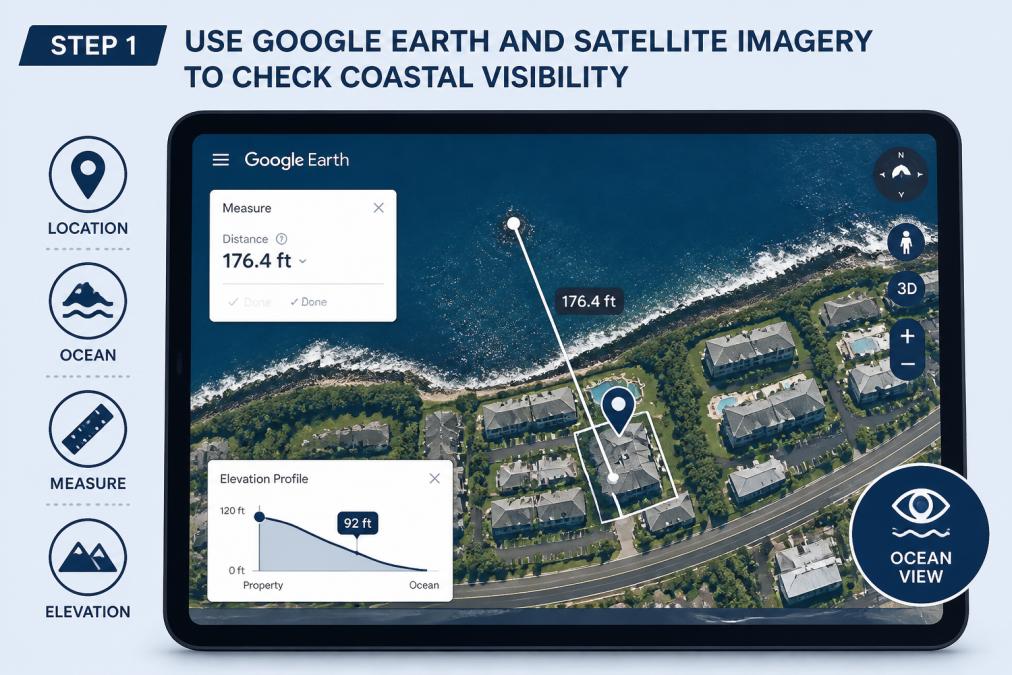
Google Earth is your first verification tool. It gives you a bird's-eye view of the property's location relative to the ocean and surrounding terrain.
Start by entering the property address into Google Earth and zoom in until you can see the building and the water. Look for: How far is the property from the ocean? What's between the property and the water? Are there trees, other buildings, or terrain features that would block the view from ground level? Google Earth's satellite imagery shows you the actual landscape, revealing what marketing copy might hide.
Measuring Distance from the Water
Use Google Earth's measurement tool to check the actual distance from the property to the ocean. Click the ruler icon and measure from the building to the waterline. A property that claims to be oceanfront but is 200 yards from the water isn't oceanfront, it's ocean view. A property that's 50 yards away with clear sight lines might deliver better views than a technically oceanfront property hemmed in by landscaping.
Identifying Obstructions and Topography
Topography matters more than most travelers realize. If the property sits on a hillside that slopes away from the ocean, your view from ground level might be completely different from what satellite imagery suggests. Look at the terrain between the property and the ocean. Is it flat or sloping? Are there trees, vegetation, other buildings, or a ridge that would block views?
Pay attention to coastal visibility, the clarity of the sight line from the property to the horizon. A property might be close to the water but have its view blocked by a cliff, dense tree line, or neighboring building. If the property is separated from the water by terrain, the view might be significantly compromised.
Step 2: Request Live Video Walkthroughs and Real-Time Verification
Photos can be misleading. Angles, lighting, and timing of day can all make a view look better than it actually is. A live video walkthrough from the property host eliminates guesswork.
Ask the host for a video call where they walk through the property, focusing on views from the main living areas and the lanai. Ask them to show you the ocean view from multiple positions, standing, sitting, from different rooms. Ask them to open windows and doors to show you the unobstructed view. A good host will be happy to do this. A host who resists or offers only pre-recorded videos is a red flag.
During the video walkthrough, pay attention to what's actually visible. Can you see the ocean clearly, or is it partially obscured? How much of the horizon is visible? Ask specific questions: "What's the view like from the master bedroom?" "Can you see the ocean from the kitchen?" "Are there any obstructions I should know about?" Real-time verification through live video is one of the most reliable ways to assess whether listing photos match reality.
Step 3: Ask the Right Questions to Vacation Rental Hosts
The questions you ask reveal whether a host is honest about their property and actually knows what they're selling.
Start with specifics: "What's the exact distance from the property to the ocean?" A host who says "it's oceanfront" but can't tell you the distance is either evasive or doesn't know their own property. Ask about obstructions: "Are there trees or other buildings between the property and the water?" "Does the view change seasonally?" "What time of day do you get the best ocean view from the lanai?"
Ask about the view from different rooms: "Can you see the ocean from the master bedroom?" "What about the living room?" If the ocean view is only visible from one room or angle, that's important context. Ask about neighboring properties: "Are there any planned developments nearby that might affect the view?" A host transparent about these details is trustworthy.
Ask about water clarity and marine observation: "What's the water clarity typically like from the property?" "Can you see marine life or boats from the view?" These questions help you understand the actual quality of the ocean view. Ask about seasonal variations: "How does the view change during winter?" "What's it like on overcast days?" Honest hosts will tell you that ocean views vary with weather and season.
Spotting Red Flags: Digital Manipulation and Misleading Photos
Listing photos can be manipulated in ways that are hard to detect. Wide-angle lenses exaggerate distance and space. Editing software can enhance colors, add clarity, and make water look bluer and skies more dramatic than reality.
Watch for inconsistencies between photos and the property's location. If the photos show a sunset view over the ocean but the property faces east (sunrise direction), the photos are either old, taken from a different property, or edited to mislead. Check the angle of shadows and the direction of light in photos, do they match the property's orientation?
Look for photos taken from unusual angles or heights. A photo taken from a rooftop might not represent the view from the living room. Be skeptical of photos showing an impossibly clear, blue ocean with perfect visibility. Real ocean views vary with weather, time of day, water clarity, and atmospheric conditions.
Check for pixel-level manipulation. Look closely at the horizon line, does it look natural or artificially enhanced? Are the colors unnaturally saturated? Ask the host for unedited photos or photos taken on typical days, not just perfect-weather days. A trustworthy host will provide a mix of photos showing the view in different conditions.
Geographic Triangulation: Confirming Viewing Angle and Horizon Line
Geographic triangulation uses the property's location, orientation, and the visible horizon to confirm that the view shown in listing photos is actually possible from that location.
Start with the property's orientation. Which direction does the property face? You can determine this from Google Earth or by checking the property address against a compass. Once you know the orientation, you can assess whether the ocean view shown in photos makes sense from that direction.
Look at the horizon line in listing photos. The horizon should align with the property's elevation and the ocean's actual location. If the property faces west and the listing shows an ocean view, that's plausible. If the property faces east and the listing shows a sunset view over the ocean, something's wrong.
Use Google Earth's street view (where available) to see the actual view from the property's location. Compare the listing photos to what you see in Google Earth satellite imagery. Do the buildings, trees, and terrain visible in the listing photos match what you see from above? Inconsistencies suggest the photos are old, taken from a different location, or significantly edited.
What Real Guests Say: How to Evaluate Reviews for View Authenticity
Guest reviews are your window into whether previous visitors actually experienced the views promised in the listing.
Look for specific comments about the ocean view. Reviews that mention "the ocean view from the lanai is clear and unobstructed" or "the view was partially blocked by trees during certain times of day" give you actionable information. Pay attention to reviews mentioning obstructions or surprises. If multiple reviews mention that the view is "not as good as the photos" or "blocked by vegetation," that's a pattern worth noting.
Look for reviews from guests who stayed during different seasons. Ocean view quality can vary with weather, water clarity, and seasonal vegetation changes. Check the date of reviews, older reviews might describe a property that's changed. Newer reviews are more reliable for assessing the current state.
Be skeptical of reviews that seem too perfect or too negative. The most reliable reviews are specific, balanced, and mention both positives and areas for improvement. Look for reviews that mention the exact view quality you're seeking. Ask the host for references from recent guests. A host confident in their property will provide contact information for guests who can speak to the accuracy of the listing.
| Verification Method | What It Shows | Reliability | Time Required |
|---|---|---|---|
| Google Earth satellite imagery | Distance from ocean, obstructions, topography | High | 10-15 minutes |
| Live video walkthrough | Actual view from multiple angles, real-time verification | Very High | 15-30 minutes |
| Host questions | Honesty about view quality, knowledge of property | Medium-High | 10-15 minutes |
| Photo analysis | Manipulation, angle consistency, editing | Medium | 10-20 minutes |
| Geographic triangulation | Viewing angle accuracy, horizon line consistency | High | 15-30 minutes |
| Guest reviews | Real experiences from previous visitors, patterns | Medium | 10-15 minutes |
Getting Started with Kona Ocean Views
When you're evaluating any ocean view rental, apply these verification methods systematically. Start with Google Earth to understand the property's location and proximity to the water. Request a live video walkthrough to see the actual view from the property. Ask specific questions about obstructions, distance, and view quality. Analyze listing photos for signs of manipulation or misleading angles. Use geographic triangulation to confirm that the viewing angle matches the property's actual location. Read guest reviews carefully for specific mentions of view quality.
At Kona Ocean Views, our properties are designed with views as a central feature. We provide live video walkthroughs to every prospective guest and answer detailed questions about view quality, obstructions, and what you'll actually experience during your stay.
The verification process takes time, but it's worth it. A property with authentic, unobstructed ocean views will transform your vacation experience. You'll wake up to the sound of waves. You'll watch sunsets over the water. You'll have a constant connection to the ocean that no photo can fully capture. Verify the view before you book, and you'll know exactly what you're getting.
When you're planning a vacation rental stay, the ocean view isn't just a marketing feature, it's often the reason you're choosing that location. Before committing to a booking, use these verification techniques to confirm that the views promised in the listing match the actual property. At Kona Ocean Views, we stand behind our ocean views with transparent photos, live video walkthroughs, and detailed answers to every question you ask. The Federal Trade Commission provides guidance on truthful property descriptions and advertising, which applies to vacation rental listings. Book with confidence knowing you've verified exactly what you're getting.
Frequently Asked Questions
What is the difference between 'ocean view' and 'oceanfront' in rental listings?
Ocean view means you can see the water from the property, but it may be partial, distant, or only from certain angles like a lanai or upper floor. Oceanfront means the property sits directly on the shoreline with immediate beach or water access. When verifying ocean views, understand that 'ocean view' properties may have unobstructed water visibility from the main living area but might not offer direct beach access. Always confirm the specific viewing angle and distance before booking.
How can I use Google Earth to verify a property's proximity to the ocean?
Open Google Earth and search for the property address. Use the measuring tool to check the distance from the property to the shoreline. Zoom in to see topography, vegetation, and potential obstructions between the property and water. Check the 3D view to assess elevation changes that might affect sight lines. Review satellite imagery from multiple dates if available to spot new construction or tree growth that could block views. Street View can also show what the actual horizon line and coastal visibility look like from ground level.
What questions should I ask a vacation rental host to verify ocean views?
Ask: 'From which rooms can you see the ocean?' 'Are views obstructed by vegetation, construction, or buildings?' 'What is the viewing angle from the main lanai or balcony?' 'How far is the property from the water?' 'Have there been any changes to the view in the past year?' 'Can you provide a video tour showing the view at different times of day?' 'Are the photos from the current year?' Request a live walkthrough via video call so you can see the actual viewing angle and water clarity on the day you call, rather than relying on staged photos.
How do I spot digitally manipulated or misleading ocean view photos?
Look for signs of enhancement: unnaturally vivid colors, overly bright skies, or water that appears too blue. Check if the viewing angle in photos matches the property's actual location using Google Earth. Compare multiple listing photos, if they show drastically different view qualities, one may be misleading. Check the photo metadata date if available; old photos may not reflect current conditions. Request recent photos or a live video tour. Read guest reviews specifically mentioning the view quality. Be skeptical of wide-angle lens distortion that makes distant ocean views appear closer than they actually are.
This article was written using GrandRanker